
Watermark Remover
he page heading, and used as this tool's description everywhere it's listed as a card. Answer the visitor's question immediately.Brush over a logo, stamp, or text watermark and remove it with a texture-aware content-aware fill.
Written by SamundraLast updated
Drag and drop a file here
Supports .jpg, .png, and .webp
Your photo is never uploaded anywhere — everything, including the fill itself, runs on your device. Works best on your own photos — please only remove marks you have the rights to edit.
Related tools

Introduction
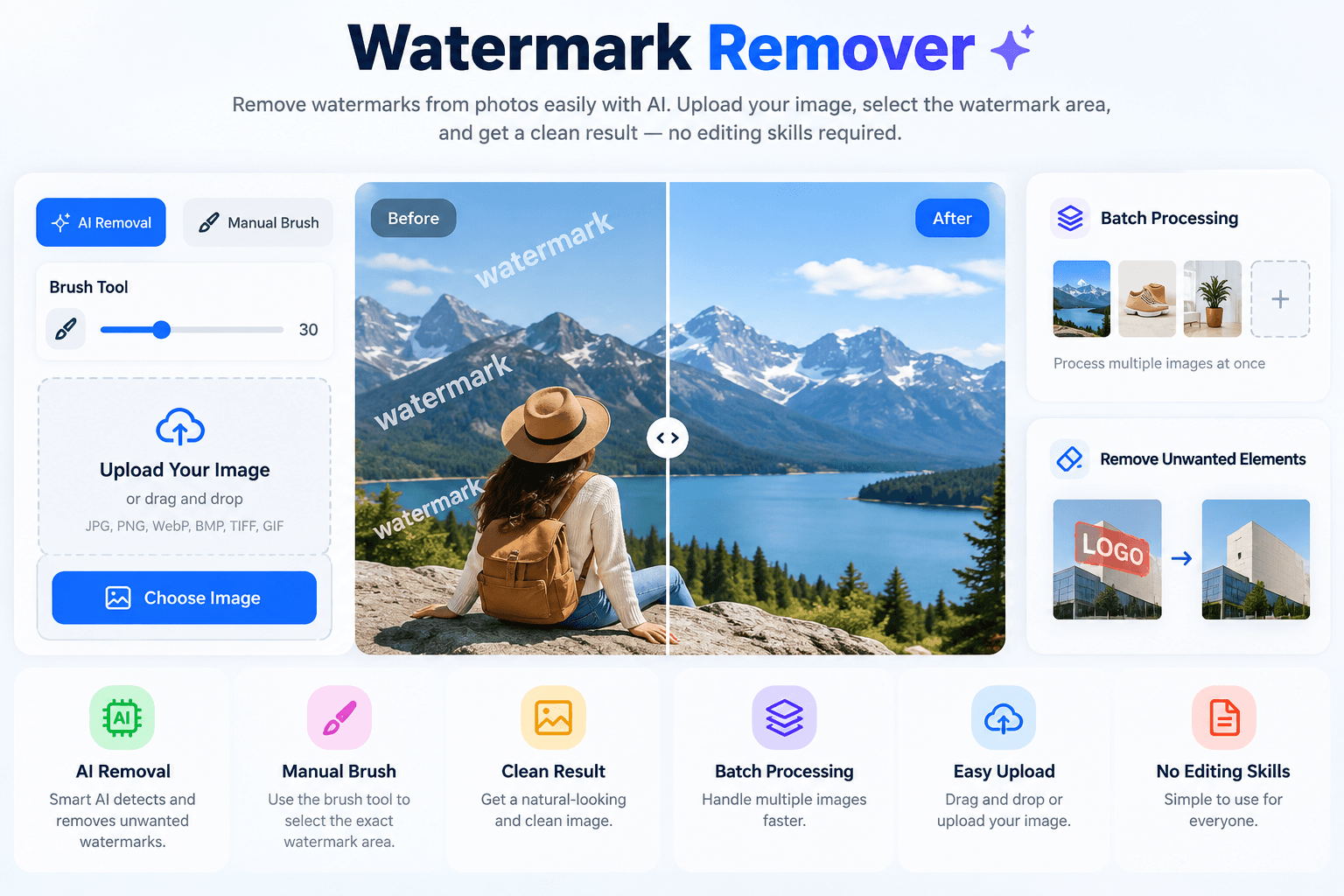
Watermark Remover is a free online tool that allows users to quickly and easily remove a watermark from an image. It mainly uses AI removal technology to remove unwanted elements. Users can use this tool to remove watermarks from images, including unwanted logos and watermarks. Removing them does not affect the image quality, as the quality remains the same as the original. This tool is designed for photographers, businesses, designers, and content creators who want clean, professional-looking images.
The AI detects the area that needs to be removed and removes logos added to the image. This process is completed through an online watermark remover. Users can upload their image and select what they want to remove. This helps improve product photos and make them more attractive to customers.
Why Use a Watermark Remover?
The main reason to use this tool is that users can remove unwanted information from images, which makes the images look better and more professional. It helps you remove a watermark from images while keeping the important details and quality of the original file. This tool makes the work easier, especially for content creators, because you don't have to spend hours editing.
Users can simply use this tool to remove unwanted logos, signatures, stamps, and text watermarks from images. This is a browser-based tool, which makes it easy to use and supports different platforms. A clear and clean image is easier for everyone to understand, so using this tool can help users create better images and satisfy their customers.
Key Features
This tool uses AI removal technology, allowing users to directly remove watermarks from images.
This provides better control and helps achieve accurate results without affecting other parts of the image. The manual brush and brush tool features allow users to highlight specific areas that need editing, making the process easier.
It can remove different types of watermarks, including text watermarks, brand logos, labels, and other marks.
The simple drag and drop feature allows users to add images quickly. No complicated steps are required.
Using this tool does not harm the original image quality. The image quality remains the same as the original.
This tool supports different mobile devices, and you can share processed images across platforms.
This tool saves time by providing a simple and automated watermark removal process.
Privacy and Security
When using any online platform, user privacy is very important. This Watermark Remover tool is secure for users because it does not display the personal information contained in an image and only works on the visible part of the image. Users should have permission to edit before removing watermarks from any image.
The browser based system provides a convenient way to edit images without installing software. Always ensure that you respect copyright rules and use watermark removal features responsibly.
Supported Files, Limits & Output
Supported Files
Image Watermark Remover supports common image formats, including:
- JPG
- JPEG
- PNG
- WEBP
- Other popular image formats
Limits
- The final result may depend on the complexity of the watermark.
- Large or detailed watermark areas may require careful selection.
- Very high-resolution images may take more processing time depending on the file size.
Output
After processing, users receive:
- High-quality clean image
- Natural-looking edited results
- Original image details preserved
- Ready-to-use images for websites, social media, and online projects
Try this Passport Photo Maker
How to use
Upload Your Image
Start by adding your image to the tool. Simply upload your image from your device or use the easy [drag-and-drop] option to upload your file quickly.

Select the Watermark Area
Use the brush tool or manual brush to highlight the exact watermark area you want to remove. Carefully select the unwanted watermark for better results.

Click on Watermark Remover
Click on Watermark Remover to start the removal process. The AI technology analyzes the selected area and removes the watermark while keeping the image quality natural.

Download Clean Image
Preview the final result and download your high-quality, clean image. The tool provides a professional result ready for websites, social media, and other digital uses.

Frequently asked questions
What is a Watermark Remover?
A Watermark Remover is an online tool that uses AI technology to identify and remove unwanted watermarks, logos, labels, and marks from images.
How does the Watermark Remover work?
The tool uses AI removal technology to detect the selected watermark area. Users can also use the manual brush or brush tool to select a specific area they want to edit.
Does removing a watermark affect image quality?
The tool is designed to remove unwanted watermarks while maintaining the original image quality as much as possible.
Can I remove logos from images?
Yes, the tool can be used to remove unwanted logos, labels, and similar visible marks from images you have permission to edit.
Can I edit text in a screenshot?
Yes, you can use a Screenshot Text Editor to edit, replace, or add text to supported screenshots.
Can I check the metadata of an image before removing it?
Yes, an EXIF Viewer can help you view available metadata before deciding whether you want to remove it.
Do I need to install software to use these image tools?
No. These online tools can be accessed through a supported web browser without installing additional editing software.
Can I remove the background from an image?
Yes, you can use a Background Remover tool when you want to remove the entire background instead of a watermark.
Last updated:
Share this tool
Know someone who'd find it useful? Send it their way.